Amazon Vendor Profitability: Net PPM and Your Own Margin
Amazon's margin on your products and yours, side by side, every week and every month.
A vendor has two margins to watch on Amazon. Net PPM (Net Pure Product Margin) is Amazon's margin on your products after the funding you pay and the discounts you fund. Amazon watches it per ASIN, and a low Net PPM is the usual reason an ASIN gets flagged CRaP (Can't Realize a Profit) or comes up in your annual vendor negotiation. Your own margin is what Amazon paid you, less that same funding, less what the product cost you.
Vendor Central shows the pieces on different screens and over different windows. InsightLeap pulls them each week and each month and lays them out together: Amazon's margin in the Net PPM Bridge, the funding and discounts behind it, and your gross profit from the unit costs you upload.
Where does Amazon's margin on my products go?
The Net PPM Bridge in each weekly and monthly report walks from what Amazon sold your products for to the margin it kept:
| Line | What it is |
|---|---|
| Shipped Revenue | What Amazon sold your products for at retail during the period. |
| less Shipped COGS | What Amazon paid you for the units it shipped. |
| Product Margin | Amazon's margin on your products before vendor funding and discounts. |
| plus Contra COGS | Vendor funding that lowers Amazon's cost of goods, such as co-op agreements and damage and freight allowances. |
| less Sales Discount | Price discounts you funded that Amazon applied at retail. |
| Net Margin | What Amazon nets on your products for the period. |
| Net PPM (from the lines above) | Net margin divided by shipped revenue. |
| Net PPM (Amazon) | The figure Amazon reports for the period. |
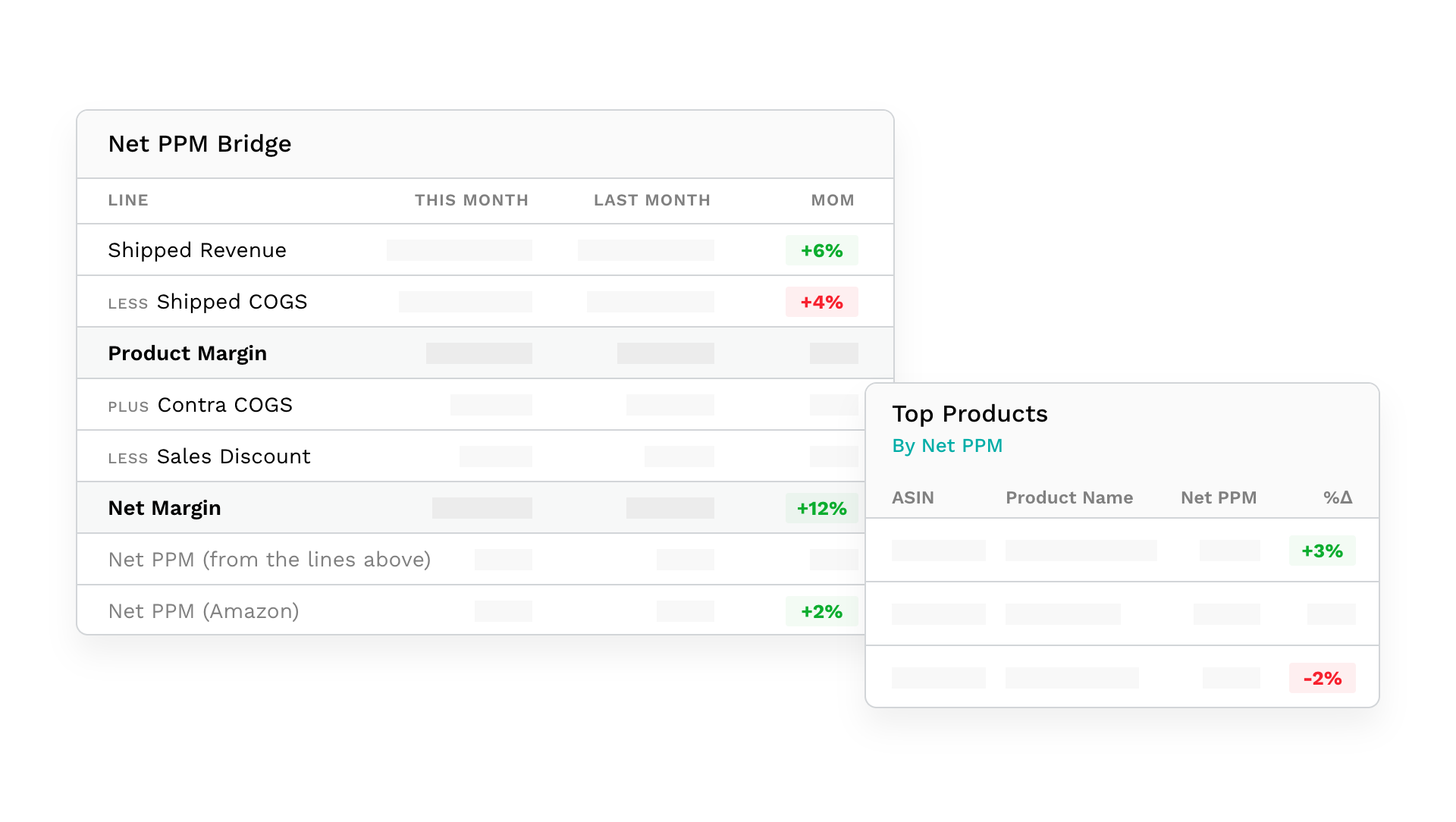
The two Net PPM lines rarely match to the decimal: returns, timing, and parts of Amazon's formula that Amazon does not publish all move its figure. Putting the ledger next to Amazon's number shows which line moved when the reported figure drops.
The figures come from Amazon's vendor analytics through the Selling Partner API, pulled weekly and monthly. Monthly figures land once Amazon publishes them, usually two to three days after the month closes.
Which ASINs are pulling Net PPM down?
An account-level Net PPM hides the products behind it. The products table carries Net PPM for each ASIN, with the prior period and the same period last year beside it, along with each product's contra COGS, contra COGS per unit, sales discount, and average discount per unit. Sort by any of them or export the table to CSV, and the reports include a Products by Net PPM table for the same purpose.
If you want to find these numbers inside Vendor Central first, our guide to finding and tracking Net PPM in Vendor Central walks through where Amazon keeps them.
How much is vendor funding costing me?
Contra COGS is the funding that goes back to Amazon out of what it paid you: co-op agreements, damage allowances, and freight allowances. The report shows it as a total, per unit shipped, and as a rate, the share of what Amazon paid you for shipped units that went back as funding. Effective COGS (shipped COGS less contra COGS) is what Amazon paid you once that funding is taken out.
Sales discounts are the price discounts you funded and Amazon applied at retail. They are reported as a total, as an average per unit, and as a total discount rate against shipped revenue. Each figure compares against the previous period, with increases marked as costs.
What am I making on Amazon?
Net PPM is Amazon's margin. Yours needs one number Amazon doesn't have: what each product costs you. Upload a cost per unit on the Manage Products page, under Upload Custom Product Details, and the report adds a Your Gross Profit panel: what Amazon paid you for shipped units, less the contra COGS you funded, less your cost per unit times the units shipped. Your Gross Margin divides that by your net revenue from Amazon (shipped COGS less contra COGS).
The calculation covers the products you have entered a cost for, and the panel states how many of the period's products that is. Costs apply when the report is read, so a new upload restates every past period at once.
Sourcing or manufacturing view?
Vendor Central reports in two views. Each InsightLeap account pulls in the one you choose, sourcing by default or manufacturing, and the reports label which view a period was pulled in and skip comparisons across views. Amazon reports contra COGS and sales discounts in the sourcing view only, so under the manufacturing view the bridge stops at product margin and says so.
Selling through Seller Central as well?
Seller Central accounts get a profit and loss in the same weekly and monthly reports, built from Amazon's seller economics data: ordered product sales, refunds, Amazon fees, Sponsored Products charges, and other deductions, down to net proceeds and net margin. Net PPM is a Vendor Central measure, so it stays on the vendor side.
Questions vendor teams ask first
What is Net PPM?
Net PPM (Net Pure Product Margin) is Amazon's margin on your products after the vendor funding you pay and the discounts you fund, as a percentage of what Amazon sold the products for. Amazon reports it for the account and for each ASIN.
Why doesn't the Net PPM in the bridge match Amazon's figure?
Returns, timing, and details of the formula that Amazon does not publish all move Amazon's figure. The bridge shows both numbers side by side, so when the reported figure drops you can see which line moved.
Does advertising count in Net PPM?
No. Net PPM is Amazon's margin on the products themselves. Ad spend, ACOS, and TACOS are in the report's advertising section.
Do I have to upload my costs?
Only for Your Gross Profit and Your Gross Margin. Everything else on this page comes from Amazon.
See it on your own numbers
Request access and we'll connect your Vendor Central account and go through your margins with you. The Amazon vendor analytics page covers the rest of the reporting, and the full feature list covers everything else.
